Changelog
Release history and what changed in each version.
AI summaries cover the whole meeting
Until now Autorec sent only the first 12,000 characters of a transcript to the AI model. That’s roughly the first 15 minutes of talking, so in an hour-long call the decisions and action items from the end never made it into the summary, and nothing told you so. Autorec now sends the whole transcript, up to about eight hours of speech.
If you run a local model with Ollama, its default context window may be too small for a long meeting. Raise it with the OLLAMA_CONTEXT_LENGTH setting before you start Ollama.
Local AI servers work without an API key
Ollama, LM Studio and llama.cpp don’t need an API key, but Autorec refused to summarise without one, so you had to type in a made-up key. You can leave the field empty now. Autorec also gives a slow local model up to 10 minutes to answer a long transcript instead of giving up after 30 seconds.
Extra request fields for your AI provider
Settings → AI Summary has a new Extra request fields (JSON) box. Whatever you put there is added to every summary request, so you can use options your provider offers that Autorec has no setting for. With OpenRouter, Use privacy settings fills in the fields that send your transcripts only to providers that keep no copy and don’t train on them.
Fixes
- The OpenRouter preset suggests current models.
A crash no longer costs you the recording
If Autorec or your whole computer goes down in the middle of a meeting, the recording now survives. Autorec writes the file so it stays playable at every moment, and the next time it starts it repairs the interrupted file and puts it in your library with a Recovered badge. You lose a few seconds at most. Autorec also catches and logs the errors that used to close it, and if screen capture stalls, it restarts the capture while the audio keeps recording.
Clear headset audio with noise suppression on
With noise suppression on, which is the default, part of every audio block went through the filter twice. That was the robotic, skipping voice some of you heard from your headset. Your microphone now ends up in the recording exactly as it came in. Autorec also mixes on the microphone’s timing instead of waiting for system audio, which should stop the short gaps in your voice that some Windows users heard during calls.
Autorec finds meetings in more places
- macOS: Autorec now picks up Google Meet and Microsoft Teams in Google Chrome. It missed them before, because Chrome’s windows go by a different name on macOS.
- Linux: the Teams for Linux app works out of the box, and so do meeting apps installed as Flatpaks.
- A Teams call you start from the Calls page, such as the Echo test call, now counts as a meeting while your browser is using the microphone.
- Joining a Teams meeting in the browser no longer splits into two recordings.
- A watcher whose pattern isn’t a valid regular expression now shows an invalid pattern badge. It used to fail silently.
When the meeting window is hidden
If you minimise the meeting or switch away from it, Autorec now records the whole screen until the window is back, instead of recording a frozen or black picture. Turn it off under Record the screen when the meeting window is hidden. Recordings that show the full screen for a while get a Shows full screen badge.
Fixes
- Windows: the in-app player finally plays your recordings. On Windows it never had.
- Windows: a long browser address could close Autorec while it was looking for meetings.
- Windows: recordings made with the built-in Windows encoder get optimised after recording like all the others, and the microphone is recorded even while nothing else on the computer makes a sound.
- macOS: Autorec could crash the moment it started recording a meeting window. The in-app player works on macOS too.
- Linux: on Intel graphics, stopping a recording that never received a picture could crash and lose the file. It now stops cleanly, and the recording keeps its audio.
- Linux Mint / Cinnamon: right-clicking the tray icon showed an empty white box. The menu is back.
- Very loud moments, when your voice and the call add up past full volume, no longer cause a click in the recording.
One thing to know if you ever go back to 0.12.9: it doesn’t understand the new “Microsoft Teams (browser, Calls page)” watcher and will record whenever the Teams Calls page is your front tab. Turn that watcher off in Settings if it gets in the way.
Transcription runs on Intel and AMD integrated graphics
Autorec loaded the GPU backend on laptops with Intel Iris Xe or AMD Radeon integrated graphics, then transcribed on the CPU anyway, because it only counted separate graphics cards as GPUs. It now uses integrated graphics too. If a computer has both, the dedicated card still wins. Thanks to the customer who tracked this down on their own laptop and sent us a working fix.
Settings → Transcription now shows what transcription runs on, plus a Last run line with the device, the model and how long it took, so you can see whether the GPU is really being used.
Fixes
- Linux: after the .deb or .rpm update, Autorec keeps running while your system installs the new version. Opening Settings in that still-running copy crashed it. It doesn’t anymore.
- Clicking Transcribe after a recording did nothing when the speech model set in Settings wasn’t downloaded yet. Autorec now downloads it first, shows the progress, and then transcribes. Picking the same model a second time in a recording works now too.
- About now includes the full license text of every open-source component Autorec is built on, under Show all license texts. It used to point you to a source tree you couldn’t see. Two of the listed licenses were also wrong and have been corrected.
The first update through the new updater
Nothing changes in the app itself. This release exists so that everyone on 0.12.7 gets to try the new updater: Autorec should tell you about 0.12.8 within a day, or right away if you press Check for updates under About. If the update doesn’t install the way the 0.12.7 notes describe, please tell us at hello@autorec.app which system you’re on and what you saw.
Autorec now tells you when there’s an update
Until now, Autorec had no way of telling you a new version was out. From this release on it asks autorec.app once a day, and when an update exists you get a notice with a link to what’s new. With the AppImage, Install now downloads the update, checks it, and restarts Autorec on the new version. On Windows the installer runs and Autorec reopens once it finishes. The .deb and .rpm open in your system’s software installer. On a Mac, Autorec closes so you can drag the new version into Applications.
Autorec checks every download against our release signature before it installs anything. If the check fails, it deletes the file and leaves your installation alone.
The daily check sends your version number, operating system and processor type, and nothing that identifies you. You can switch it off in Settings → Privacy; after that, Autorec only checks when you press Check for updates under About. The same page has a separate Share anonymous usage data option. It’s off unless you turn it on. The privacy policy lists exactly what it sends and how to have it deleted.
Since this is the first version that can update itself, you’ll need to install 0.12.7 by hand one last time.
Fixes
- Clicking About in Settings froze the app and then crashed it. It opens normally now.
- Windows: transcription, trim and compress progress stayed stuck after the first task, because file paths with backslashes broke the status updates. A file name with a quotation mark in it did the same on every platform. Both are fixed.
- An email address containing a quotation mark could leave the license activation spinner running forever, or stop Settings from loading.
- Quitting during a model download or a license check could crash Autorec on the way out or damage its settings file. Quit now waits for both to stop cleanly.
- Linux: opening a link with no browser set up for it froze the app for 25 seconds or more. It now fails right away.
- Linux: the app could freeze at full CPU while a browser window was open.
- Running a newer Autorec build and then an older one on the same machine could erase your license key and settings. Settings from a newer version no longer do that, and a settings file that can’t be read is kept aside instead of being overwritten.
- Linux: Autorec no longer fails to open its window while another app built on the same web toolkit is running.
- Task badges on library cards and table rows (“Compress”, “Transcription”) are now translated.
Also in this release
The app is now available in Dutch, Polish, Swedish, Turkish and Ukrainian, so every language you can pick for transcription has a matching interface language.
Transcription in 17 languages
Transcription was pinned to English. A German meeting came out as English-shaped nonsense even though the models Autorec downloads understand many languages. Whisper now detects the spoken language on its own, and Settings → Transcription has a new Spoken language setting to pin one when detection gets it wrong: English, German, Spanish, French, Italian, Portuguese, Dutch, Polish, Swedish, Turkish, Russian, Ukrainian, Arabic, Hindi, Chinese, Japanese and Korean.
Edited transcripts update the subtitles
Editing a transcript in the recording view saved the text file only, so the .srt subtitles kept the old words. The subtitles are now updated with the edit, as long as the number of lines stays the same. If lines were added or removed the subtitles are left as they were, since there is no honest way to time the new lines.
While fixing this we found that merged subtitles carried a stray cue number at the end of every cue’s text. That is fixed too.
Hardware encoding on Intel and AMD
The Intel Quick Sync and VAAPI encoders were never usable, so recordings on those machines always fell back to the software encoder. They are now fed the frame format they expect. This has been tested only as far as making sure nothing changed for NVIDIA and software encoding; if a recording on an Intel or AMD machine looks wrong, tell us.
Also in this release
- Linux: the thin scrollbar strip that showed through open dialogs in the recording view at some window sizes is gone.
- The
--test-recordcommand now exits with an error when the recording could not start, so scripts can rely on it. A recording folder that cannot be written to no longer crashes the app; the recording fails to start with a clear message.
Windows packages work without an ffmpeg install
The Windows installer and ZIP shipped no ffmpeg.exe, so on a stock machine transcription, thumbnails, trim, compress and merge all failed. Both packages now carry the same LGPL FFmpeg tool the Linux and macOS packages do, next to autorec.exe, and Autorec uses that copy rather than whatever ffmpeg you may have installed.
Also in this release
- Windows: trim, compress and merge did nothing at all, with only “ffmpeg merge failed” to show for it, and Compress was missing from the recording view. Both came down to how Windows runs commands, and both are fixed.
- Recording length is read in-process instead of through an
ffprobetool that no package ships. Before, lengths showed as 0 and thumbnails were taken from the first second rather than from 10% in. - Thumbnails and trim points were wrong on systems with a comma as the decimal separator (German, French and others), because the seek time was written with a comma.
Linux packages record on any machine
The .deb and the AppImage could only record on a machine with an NVIDIA card. They used the distro’s FFmpeg, and Ubuntu’s build has no software H.264 encoder Autorec is allowed to use. Without NVENC every recording failed with “All video encoders failed”.
All Linux packages now ship their own FFmpeg with the OpenH264 encoder, so recording works with or without a GPU. It also brings the ffmpeg tool that thumbnails, transcription, trim, compress and merge rely on. Before, those needed an ffmpeg installed on the system. The bundled copy stays inside Autorec’s own folder and does not replace your distro’s ffmpeg.
One RPM for every RPM distro
The separate Fedora 43 and Fedora 44 packages are replaced by a single .rpm. The same file installs on Fedora 43, Fedora 44 and openSUSE Tumbleweed.
Recordings keep their shape
Captured frames were stretched to fill a 16:9 picture, so a window of any other shape came out squashed, and its thumbnail with it. Frames are now fitted inside the picture with black bars. Recordings made before this release stay as they are.
Also in this release
- The library updates on its own when a recording stops or a transcript, trim, compress or merge finishes. It used to need a manual reload.
- Quit closes the app even while a merge, trim or compress is running. It used to wait for the job to finish, or hang for good, and the leftover process then blocked every later launch with “already running”. Interrupted jobs can be retried after the next start.
- Merge, trim and compress no longer sit at 0% forever when Autorec was started from a terminal. Cancel now works on a stuck job too.
- Linux: page content painting over open dialogs in the recording detail view is improved. At some window sizes a thin scrollbar strip still shows through until it fades.
- The AppImage is smaller again, 111 MB down to 89 MB. The .deb grew from 33 MB to 46 MB because it now carries FFmpeg.
The AppImage starts on Fedora again
The AppImage crashed at startup on Fedora and on every other distro that is not Debian or Ubuntu. It carried its own copy of WebKitGTK, and that copy looks for its helper programs at a path that only exists on Debian-family systems.
The AppImage now uses the WebKitGTK that your distro provides and only brings the libraries a system is likely to lack. It needs WebKitGTK 6.0 and libadwaita installed, which current desktop distros have. The download shrank from 162 MB to 111 MB.
RPM packages
This release adds RPM packages for Fedora 43 and Fedora 44. They install with dnf on a stock system, with no RPM Fusion repository needed.
Also in this release
- AppImage: quitting or stopping the app from a terminal or a session manager now reaches Autorec itself instead of a wrapper script, so it shuts down cleanly
Switching browser tabs no longer ends the recording
Meet, Teams and Zoom in the browser are detected by the tab title. A browser names its window after whichever tab is in front, so switching to another tab mid-call made the meeting vanish as far as Autorec could tell. It closed the file, then started a new one when you switched back. One Teams call came out as nine recordings.
Autorec now checks the microphone before it gives up on a meeting. As long as the meeting’s window still exists and the app is using the microphone, the recording carries on, whatever the title says. Once the app lets go of the mic, the meeting ends after the usual grace period.
Telegram calls
Telegram is detected out of the box. Its window title is the contact’s name, both for an open chat and during a call, so the title says nothing about whether you are on a call. Autorec watches Telegram’s microphone use instead, the same way it does for Signal and Element. Telegram only holds the microphone during a call, so leaving it open all day records nothing.
If you are upgrading, the Telegram watcher arrives on the next launch.
The price comes from one place
Nothing in the app changed in this release. The website no longer prints a fixed price anywhere: the pricing card and the cost calculator read it live from the checkout provider, so the number on the site and the number you pay cannot drift apart.
The app never showed a price of its own. Buy opens the checkout page, and the price is there.
Four more apps detected out of the box
Autorec now notices calls in Proton Meet and Jitsi Meet in the browser, and in the Signal, Element and Proton Meet desktop apps. Zoom, Teams and Google Meet still work as before. If you are upgrading, the new watchers arrive on the next launch. You don’t have to press Restore Defaults.
Detection by microphone use
Signal, Element and the Proton Meet app never change their window title. It says “Signal” whether you are idle or on a call, so a title watcher would have recorded them all day. Autorec now has a second signal: it watches whether the app has the microphone open. Recording starts when the app grabs the mic and ends once it lets go, after the usual grace period.
Two things to know. A call you put on hold that releases the microphone ends the recording. And on macOS this signal needs 14.2 or newer; older systems keep the title watchers and skip this one.
Add an app
Settings → Watchers has a new Add an app button. It lists the apps running right now, copies the real process name for you, and asks when to record: when the window title looks like a meeting, when the app is using the microphone, or whenever the app is running at all. Telegram, Discord, Webex or your own Jitsi server take a few clicks each.
For an app that is not open at the moment, pick its file instead. The watcher shows a “not running now” badge until the app is seen for the first time.
Also in this release
- Windows: browser calls are detected again. Google Meet and Teams in the browser were never picked up on Windows, because the process patterns expected
chromeand Windows reportschrome.exe. Fixed.
One meeting, one file
A meeting used to come out as two or three separate recordings. Switching the captured window split the file. So did Zoom, which quietly destroys and recreates its window when a call starts and again when someone shares a screen. Each time, that cost you another MP4 and another transcript to reconcile by hand.
That is fixed at the source. Switching windows mid-recording now retargets the recording in place: same file, same timer, same filename. If a meeting recreates its window, Autorec follows it. And a brief gap in detection no longer ends anything: it waits 15 seconds before deciding a meeting is really over.
Merge recordings
For the splits that already happened, and for crashes, any two or more recordings can be joined into one. Select them in the library and pick Merge.
When the clips match, Autorec stitches them without re-encoding, which takes seconds and loses no quality. When they differ, it says so before you commit, and names both the resolutions involved and the one it will re-encode to. Transcripts come along too: the .srt cues move onto the merged timeline, so subtitles stay in sync all the way through.
The originals stay put by default. You can tell Autorec to replace them instead, and it only does so once it has verified the merged file.
When Autorec cannot prevent a split (a crash, say), the prompt after recording tells you the meeting came out in parts and offers to merge them.
Also in this release
- Compress works on macOS. It had never run there: the button failed on every attempt, for two separate reasons in the bundled video toolchain. Both fixed, with the same size targets you get on Linux and Windows.
- Recordings made in the same minute no longer overwrite each other. Filenames are timestamped to the minute, so a second recording that started inside that window used to silently replace the first.
- Switching windows no longer costs a second recording against the free-tier quota, and no longer restarts the 40-minute cap. One continuous file counts once.
Buying and activation
Clicking Buy now visibly does something. If the browser fails to open, you get the link to copy instead of silence.
- Licenses that arrived without an email address attached repair themselves at startup, so activation no longer looks broken
- The About dialog shows the license email and activation date on one line, without a dangling dash when the email is empty
Transcription on your GPU
Transcription now uses your graphics card: Vulkan on Linux and Windows, Metal on macOS. Long meetings that used to tie up the CPU for minutes finish much faster.
There is nothing to configure. Autorec picks the best available option at startup and falls back to the CPU on a machine with no usable GPU. If a GPU run fails, it retries on the CPU, tells you it did, and stops trying that GPU rather than failing the same way again.
Settings shows which backend and device is in use, and a Force CPU toggle is there if you want the GPU left alone.
Start when you log in
An auto-recorder is only useful while it is running, and a fresh install never came back after a logout. Autorec now enrolls itself at login on first launch, and there is a Start when you log in toggle in Settings if you would rather it did not. Turning it off sticks.
Installing the .deb or .rpm also brings the tray icon up straight away, instead of leaving you to find and launch it yourself.
The Linux .deb starts again
The v0.10.0 .deb installed but refused to launch on most machines. It had been built against GPU libraries that only existed on our build server, so anywhere else it failed before reaching a window. Rebuilt without them. If you installed v0.10.0 on Linux, this is the fix.
Also in this release
- The downloads page now offers the build for the system you are on, with the full list one click away
macOS
Autorec runs on Apple silicon. The .dmg is self-contained, so you do not need Homebrew or a separate FFmpeg install.
macOS gates screen and microphone access behind its own permission prompts, so the first launch walks you through granting them. Without the screen recording permission, macOS hides window titles from every app, which means Autorec cannot see that a meeting started at all; the app now tells you that instead of sitting there quietly.
The build is ad-hoc signed, so the first launch needs a right-click and Open rather than a double-click.
Also in this release
- Changes to the Prompts settings card now save to disk (they were being discarded on close)
Launching again brings the window back
Starting Autorec while it was already running in the tray appeared to do nothing at all. It now brings the existing window to the front. Launching it deliberately opens the window; starting at login still goes straight to the tray without one.
Audio and video stay in sync
On a long recording, audio drifted ahead of video. Over a 40-minute meeting the gap reached about 21 seconds, which is enough to make the recording useless for anything but listening.
The capture side was delivering frames slightly faster than the target frame rate, and the timestamps were being nudged forward to compensate. Once video pulled ahead it never came back. Timestamps are now pinned to the clock, and surplus frames are dropped rather than pushed into the future. A 45-second test recording lands at 45.10s of video against 45.12s of audio.
Also in this release
- The library no longer shows a permanent “Transcript queued” label when nothing is being transcribed
Downloads work again
Every download link on this site was broken, and so was the in-app update check. The release files lived in a private repository, so anyone who was not signed in as us got a 404. They are now published to a public one.
If a download failed for you before today, try again.
Also in this release
- A press page with logos, screenshots, and the details journalists ask for
Correct version on the AppImage
The AppImage filename carried a stale version number, so the file you downloaded did not obviously match the release it came from. It now takes the version from the build itself.
Maintenance
Another release-pipeline fix with no effect on the app itself. Skip it if you are already running 0.9.3.
Maintenance
Build and release plumbing only. Nothing changes in the app, so there is no reason to update if you are already on 0.9.2.
Pricing in euros
The pricing page now quotes euros and matches what you are actually charged at checkout. It also states the device count correctly: one license covers five devices.
The AppImage opens the real app
The v0.9.0 AppImage came up showing a placeholder window instead of the settings interface. It was looking for its own files at a fixed location that only exists on a normal install, so inside an AppImage it found nothing. It now looks relative to itself and works wherever you put it.
Checkout also moved to a new payment provider. Existing licenses keep working.
First public release
Autorec watches for Zoom, Teams, and Google Meet. It starts recording when a call begins and stops when it ends. Everything after that happens on your own machine: transcription, summaries, trimming.
Editable AI summary prompt
The system prompt that drives every AI summary is yours to edit. Ask for decisions, action items, risks, deadlines — whatever your team actually reads. The default returns a JSON {title, summary} shape so your library still gets meeting titles automatically; keep that part intact and rewrite the rest however you like.
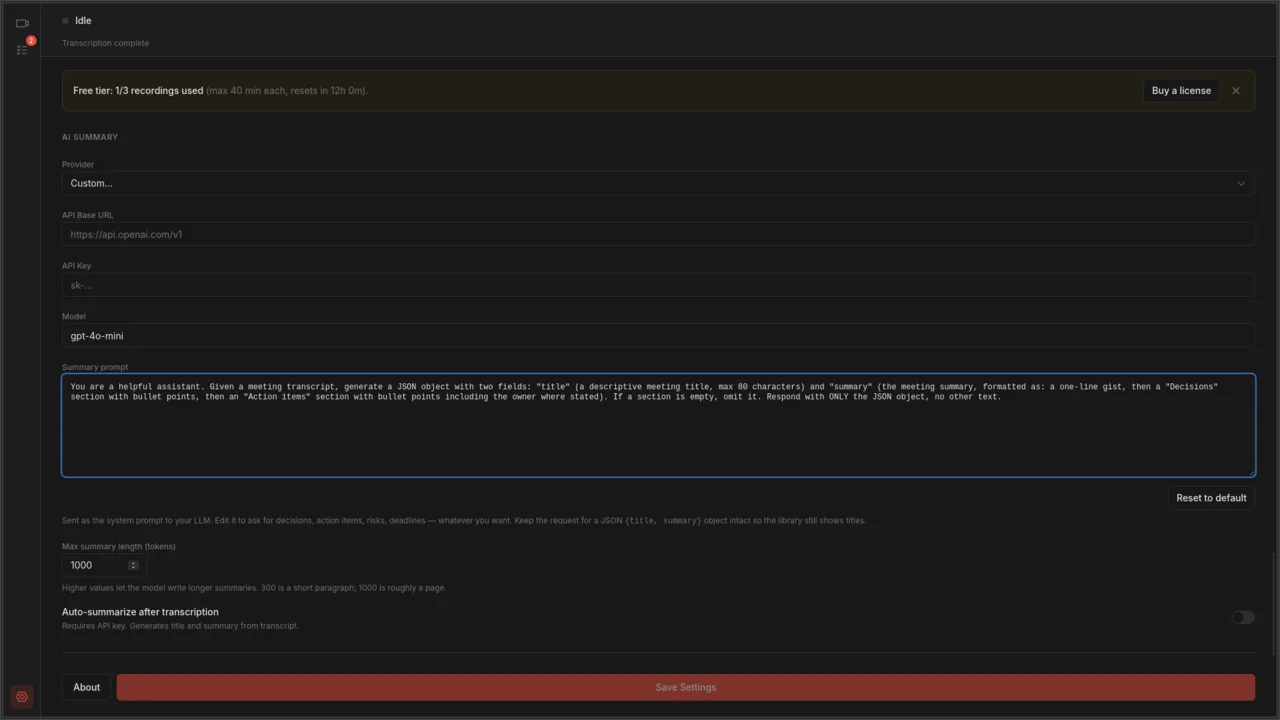
Provider presets — one dropdown, twelve LLM backends
Switching between OpenAI, Anthropic, OpenRouter, Groq, Cerebras, SambaNova, Hyperbolic, Ollama, LM Studio, LocalAI, llama.cpp, and vLLM is one click. Pick a preset and the base URL plus a sensible default model fill themselves in.

Per-source audio toggles
Mic and desktop audio each get their own toggle, device picker, gain slider, and live level meter. Capture the whole desktop or only specific apps, with two-way or mic-priority ducking so neither side gets buried.

Processing queue
Every transcription, summary, and compression job lands in one list with its own progress, status, and cancel button. Filter by active, completed, or failed. Close the window and the queue keeps working.

Honest shareware
Three free recordings every 24 hours, up to 40 minutes each, with a five-minute warning before auto-stop. Pay once and the cap goes away; one key covers five devices. No DRM beyond a polite nag, and your existing recordings stay yours either way.

Everything else in the first release
- Automatic meeting detection for Zoom, Microsoft Teams, and Google Meet
- Window-specific capture — records the meeting window, not your whole screen
- Hardware-accelerated encoding (NVENC, QSV, VAAPI)
- Quality presets: 1080p, 720p, 480p at 15/24/30 fps
- Local transcription via whisper.cpp, with
.txtand.srtoutput - Five transcription model sizes, from tiny to large
- AI-generated titles and summaries through any OpenAI-compatible API
- Video library with card and table views, search, and sorting
- Built-in player with a transcript viewer, clickable timestamps, and inline editing
- Trim recordings to cut dead time; compress them to save disk space
- System tray integration, with a red icon while recording so the state is obvious across the room
- Audio level meters read correctly on locales that use a comma as the decimal separator, like German and French, where they previously sat flat at −120 dBFS
- Configurable output directory, filename templates, quality, and per-app toggles
- Available for Linux (AppImage,
.deb) and Windows (.exe)